
The following assistive technology software programs and devices featured on this page are some of the programs and devices available for loan for students who work with the CLASS Office and qualify for use.听Some of these items may be checked out for personal听and classroom use. For more information, please contact the CLASS Office at 612-330-1053 or at听class@augsburg.edu.
Reading/Literacy Support:
Read & Write and OrbitNote
Features:
- Literacy software that supports reading, writing, study skills, and research
- Toolbar integrates into many popular computer programs including Microsoft Word, Adobe Reader, and web browsers
- Text-to-Speech (read aloud) with many voice options and adjustable speed, Word Prediction, Screen Masking, Dictionaries, and Highlighters are just a few of the almost 25 features
- Available in the web browser as a chrome extension and as a desktop installation
- More Information:
- Help guides: and OrbitNote Learning Resources
颁辞尘辫补迟颈产颈濒颈迟测:听Windows; Mac; Chrome Extension
NaturalReader EDU

Features:
- Reading assistive technology tool where students can have books, articles, and scanned images read aloud
- Students can chose from a variety of AI and Premium voices within the app
- Some of the features include being able to highlight and take notes while reading, a web reader, adjustable voice speed, CC for seeing text in isolation while reading, a timer and more
- More Information:
- Help guides:
颁辞尘辫补迟颈产颈濒颈迟测:听Online Resource, Chrome Extension, Android, iOS
C-Pen Reader

Features:
- Reading pen that reads text out loud with a digital voice
- Text to speech with a variety of languages to choose from
- Built-in dictionary
- Allows for voice memos
- Transfer scans to PC or Mac
- More information:
- Help guides:
Compatibility:听Standalone device, use PC or Mac to upload books
Scanmarker Reader

Features:
- Scanning pen that scans for text on a physical page or paper and converts it into digital text that can be read aloud
- The online reading platform allows users to customize the appearance of the text, listen to the text, and translate into a variety of languages
- More information:
- Help guides:
Compatibility: Standalone device, and Online web-app
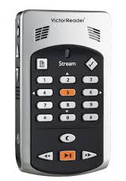
Victor Reader Stream
Features:
- Portable book player for DAISY books
- Download books from Learning Ally and other book libraries
- Record lectures and listen to these and your books while on the go!
- Accessible for students with low vision or who are blind, as well as those students with a Print Disability
- More information:
Compatibility:听Standalone device, use PC or Mac to upload books
狈辞迟别-迟补办颈苍驳听厂鲍笔笔翱搁罢:
Smart Pens

Features:
- Take handwritten notes and record your lecture using the same device
- Written notes are synced with the audio recording using specialized notebooks
- Tap on any written text and listen to your lecture from that exact moment in the lecture or meeting
- Upload your notes to your computer for playback, and ability to search content
- More Information:
- Help guides:
Compatibility:听Standalone Device with Supplemental Software for Windows or Mac
Glean

Features:
- Type your notes on your computer while syncing a PowerPoint presentation and the audio recording of the lecture together
- Sync typed notes with audio recording to find corresponding aspects of lecture or notes
- Additional features include audio transcription, study timer, task list, and more
- Available as a online web application or a mobile application
- More Information:
- Help guides:
颁辞尘辫补迟颈产颈濒颈迟测:听Windows: Mac; Chromebook; iOS; Android
Notability

Features:
- Write, type, or annotate using highlighters your notes using the all-in-one notetaking app
- Ability to take pictures and audio record with the sound being linked to your notes
- Use Google Drive, Dropbox and Box to import, export and share documents such as PowerPoints and take notes directly on them
- Organize all your notes in one place
- More Information:
- Help guides:
Compatibility:听Mac; iOS:听iPad, iPhone
Otter.ai

Features:
- Live transcription note taking technology
- Provides keywords, and students can add additional comments and highlights on the transcript
- Works with Zoom, Google Meet, and Microsoft Teams
- More Information:
- Help Guides:
Compatibility: Online Resource;听iOS; Android
ScanMarker Air

Features:
- Digital Highlighter
- Scan text directly from print material and uploads through Bluetooth or USB connection to a computer
- Allows for gathering of print information in a digital format
- More Information:
- Help guides:
Compatibility:听Mac; iOS
Digital Voice Recorders

Features:
- Record your lectures on a portable device
- Listen to your lectures on the device or upload them to your computer using the USB cable (included)
- Folder system allows you to organize recordings by class
颁辞尘辫补迟颈产颈濒颈迟测:听Standalone device, upload recordings to PC or Mac (optional)
Study Support:
Pro-Study

Features:
- Research collection tool that helps assist students with staying organized while gathering research for a paper or project
- Students can collect images, text, website links, add notes, and more to their ProStudy portal
- Students can have all of their research in their ProStudy online cloud-based portal to access from any device
- Generate citations and export references into various citation styles
- More information:
- Help guides:
Compatibility: Online Resource and Chrome Extension
MindView

Features:
- Mind mapping and organizational planning software
- MindView allows students the opportunity to plan and write their papers in a visually organized way
- Students can export their mind maps into various citation styles such as APA and MLA
- It also has other features that can assist with research, presentations, and studying
- More information:
- Help guides:
Compatibility: Online Resource, Chrome Extension, Mac, Windows, Android, iOS
Writing Support:
Grammarly EDU

Features:
- An application that can assist with finding writing mistakes and contextual errors, spelling errors, and poor vocabulary usage
- Find the right word you are looking for with synonym suggestions
- Learn from your mistakes to avoid them in the future
- Grammarly works in emails, essays, and more
- More information:
- Help guides:
Compatibility: Chrome Extension; iOS; Android
Dictation:
Dragon Naturally Speaking

Features:
- Use Dragon, Speech Recognition Software, to turn your spoken words into text
- Create documents, emails, surf the web and more by talking to a microphone on your computer
- Use simple voice commands to execute tasks and control most programs on your computer
- More Information:
- Help guides:
颁辞尘辫补迟颈产颈濒颈迟测:听Windows
Google Voice Typing

Features:
- Speech to text program
- Uses simple voice commands to assist with typing in a Google Doc
- Built into Google platform
- More Information:
颁辞尘辫补迟颈产颈濒颈迟测:听Windows, Mac, iOS, Android
Digital Math
Equatio

贵别补迟耻谤别蝉:听
- Digital math assistive technology
- Includes handwriting recognition, text to speech, graph editor, speech input, and more
- Can be used in a variety of online platforms
- More information:
- Help guides:
颁辞尘辫补迟颈产颈濒颈迟测:听Chrome, Windows, Mac
Screen Readers/Magnification Software:
FUSION

Features:
- Screen Reader and Zooming software
- Reads aloud what is on the computer screen while zooming in on the computer content
- More Information:
Compatibility: Windows
JAWS by Freedom Scientific

Features:
- Screen Reader developed for those with vision loss
- Reads aloud what is on the computer screen
- Intelligent tools for accessing and navigating webpages and screen content
- Can be paired with a Refreshable Braille Display for Braille output instead of speech
- More Information:
- Help guides:
Compatibility: Windows
ZoomText

Features:
- Magnification and Screen Reading Software for students with visual impairments
- Enlarges and enhances text and graphics on a computer screen while keeping clarity intact
- Works with many popular computer programs and applications
- Magnifier/Reader version reads text on a computer screen out loud
- More Information:
- Help guides:
Compatibility: PC and Mac
Built-In Accessibility:
Windows

Features:
- Personalize your Windows Computer with any of the build-in Accessibility Features to support ease with seeing, hearing, and mobility interactions with computer
- Features Available Are: Screen Reader/Text-to-Speech (Narrator), Magnification (Magnifier), Keys Commands (Mouse Keys), Speech-to-Text and Voice Control (Speech Recognition), Visual Notification to replace sounds, Keyboard on Screen, Toggle Keys, Adjustable Mouse Settings, High Contrast Schemes, and Ability to Personalize the Appearance of the Computer including text
- Tutorial Videos Available on the websites below
- More Information:
Compatibility:听奥颈苍诲辞飞蝉
Mac

Features:
- Personalize your Mac Computer with any of the build-in Accessibility Features to support ease with seeing, hearing, and physical/mobility, literacy interactions with computer
- Features include: Text-to-Speech (VoiceOver), Zoom, High Contrast, Sticky Keys, Speech-to-Text and Voice Control (Speech Recognition), Word Completion (Word Prediction), and more!
- More Information:
Compatibility: Mac
Organizational Tools:
Planners

Features:
- Daily, weekly, and monthly organizational planning spaces
- Assists with tracking schedules and classwork
- Portable
Compatibility: N/A
Google Suite

Features:
- Apps built into Gmail accounts
- Includes access to Google Calendar, Tasks, Keep, Docs, Sheets, and more
- Items put into Google Task and Keep can by synched directly to the google calendar to assist with keeping track of items and organizational planning
- More Information:
Compatibility: Windows, Mac, iOS, Android